
MOTORCYCLE ECU FILE LIBRARY
XDF Files
Find the right definition for your next tune.
Find your ECU file
MotoBinXDF.com · Stock BIN
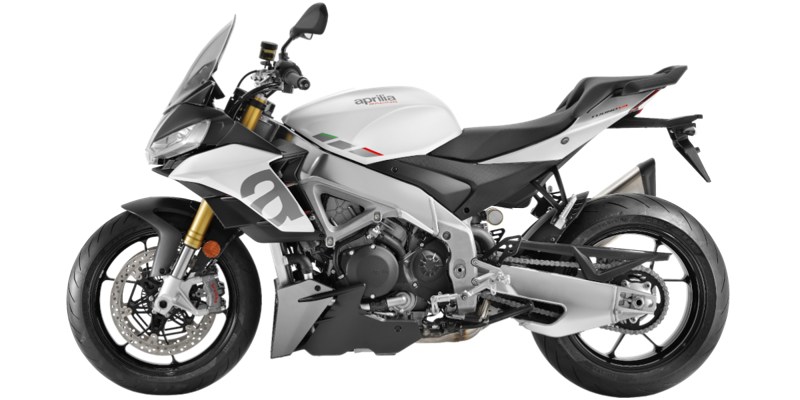
Aprilia TUONO 1100 V4 RR E5 2021+ — P80LEB10 · CM301814 Dimsport Stock BIN

| Software ID | P80LEB10 |
|---|---|
| ECU type | Marelli IAW 11MP (11MPHW001) |
| Read tool / format | Dimsport |
| Calibration ID | CM301814 |
| Model years | 2021+ |
| Compatible BIN size | 3584 KB |
€50.00
You receive: Stock BIN file
Instant email delivery · Verified map preview · Secure PayPal checkout · Digital files are non-refundable once delivered (Refund policy · Terms)
File reference & categories
Description
Stock/OEM BIN file for Aprilia TUONO 1100 V4 RR E5 (2021+), Marelli IAW 11MP (11MPHW001, Boot FF59) in Dimsport OBD 3,584 KB format (FLASH_0841). SW: P80LEB10, Cal: CM301814, Market: USA. Tier: OEM Stock. Notes: Source notes reference restrictions related to engine shutdown at high temperature and a separate unlocked variant for reported overheating cases. Latest standard USA mapping update.
ECU: Marelli IAW 11MP (11MPHW001, Boot FF59, Codebase CB08). SW: P80LEB10, Cal: CM301814, Market: USA. Match HW ID, Boot Gen (FF59) and SW ID before flashing.
Size: 3584 KB
Software ID: P80LEB10
Calibration ID: CM301814
to check for an exact reference match before choosing a definition.
More Aprilia TUONO 1100 V4 RR E5 ECU BIN & XDF Files
BINDimsportP80HED07 · CM301826MotoBinXDF.com.binAPRILIAP80HED07 DIMSPORT Aprilia TUONO 1100 V4 RR E5 2021+
P80HED07 · CM301826 Dimsport
ECUMarelli IAW 11MP (11MPHW001)
Dimsport · 3584 KB
€80.00 EURBINDimsportP704OA07 · CM351401MotoBinXDF.com.binAPRILIAP704OA07 DIMSPORT Aprilia TUONO 1100 V4 RR E5 2021+
P704OA07 · CM351401 Dimsport
ECUMarelli IAW 11MP (11MPHW001)
Dimsport · 3584 KB
€50.00 EURXDFDimsport 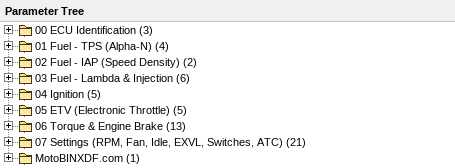
Aprilia TUONO 1100 V4 RR E5 2021+
P704OA07 · CM351401 Dimsport
ECUMarelli IAW 11MP (11MPHW001)
Dimsport · 3,584 KB
€80.00 EURXDFKESS V3 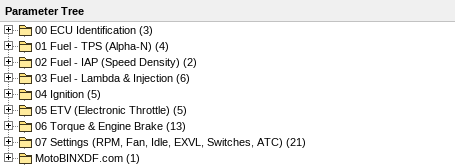
Aprilia TUONO 1100 V4 RR E5 2021+
P704OA07 · CM351401 KESS V3
ECUMarelli IAW 11MP (11MPHW001)
KESS V3 · 4,096 KB
€80.00 EURXDFDimsport 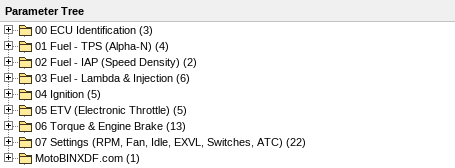
Aprilia TUONO 1100 V4 RR E5 2021+
P80HED07 · CM301826 Dimsport
ECUMarelli IAW 11MP (11MPHW001)
Dimsport · 3,584 KB
€110.00 EURXDFKESS V3 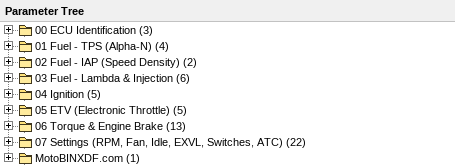
Aprilia TUONO 1100 V4 RR E5 2021+
P80HED07 · CM301826 KESS V3
ECUMarelli IAW 11MP (11MPHW001)
KESS V3 · 4,096 KB
€110.00 EUR
Technical FAQ
How do I open this Aprilia TUONO 1100 V4 RR E5 P80LEB10 · CM301814 BIN in TunerPro?
Open the BIN in TunerPro or TunerPro RT and select a separate XDF for its calibration and the 3584 KB BIN layout. Check that your reading or flashing tool supports that layout before using the file.
How do I verify my Aprilia TUONO 1100 V4 RR E5 BIN matches P80LEB10 · CM301814?
Compare the ECU part number, calibration ID and read format with the listing. Use the BIN identification tool to compare your file’s fingerprint and size with the reference catalogue without uploading the BIN. A modified read may not match.
Does TunerPro automatically correct the ECU checksum?
TunerPro can calculate checksums when the definition and a compatible plug-in support the exact ECU layout. Verify the saved BIN before flashing with the ECU BIN Checksum tool if the layout is supported, or follow your flashing tool’s checksum instructions.
ECU FILE TOOLS
ECU BIN Checksum
Check and correct supported Japanese motorcycle ECU BIN files.
No file selected · Maximum 16 MiB
Processed in your browser. Your file is never uploaded.
Only recognized ECU layouts can be corrected. Your original file is kept unchanged.
Ready to check
Choose your BIN file, then check its checksum.
Contact Us
Need help with a file, payment or download? Send a message to [email protected].
File Request
Can't find the BIN or XDF you need? Tell us about your ECU and the file you are looking for.
A file request does not create an order or charge your card. Any attached BIN is handled privately and is never published or executed.
YOUR MOTOBINXDF ACCOUNT
My Account
Manage your details, orders and downloads.
Loading your account…
Help
How do I find the right file?+
Choose BIN Files or XDF Files, then manufacturer, model and year. You can also search by ECU part number or calibration ID. Check the exact software reference, BIN size and read tool on the product page.
How does BIN identification work?+
Your browser calculates the file fingerprint — and reads BMW Motorrad BMS-X / BMS-MP / BMS-O SWE calibration IDs locally when present — and sends only those identifiers and file size for comparison. The BIN stays on your device. Exact reference matches and supported BMW calibration IDs return linked definitions; modified or unknown files on other ECUs may not match.
What are BIN and XDF files?+
A BIN contains ECU binary data. An XDF describes the maps and settings for compatible software such as TunerPro. The definition must match the ECU software.
Which TunerPro version should I use?+
For XDF patch operations, use TunerPro 5.00.10305. Our tests found that TunerPro 6.0.496.0 can read patch data incorrectly after reopening a definition. Always edit a copy of your original BIN.
How fast do I receive files and what are the download limits?+
Delivery is automatic immediately after PayPal confirms payment. Download links are emailed to your PayPal address and appear in My Account. Links remain active for 72 hours with up to 5 downloads per file. For €0 orders redeemed with a 100% discount coupon, download links are sent to the email address entered at checkout.
What if I ordered the wrong file or need a refund?+
Digital files are non-refundable once delivered, as detailed in our Refund & Digital Delivery Policy. If a delivered file is corrupted or does not match its listing specifications, contact [email protected] within 14 days with your order number.
How can I purchase a file or get an order receipt?+
Prices are in EUR. Add a file to your cart and pay securely with PayPal (guest checkout is supported). Your PayPal confirmation and order page serve as your purchase receipt. For VAT/order enquiries, contact [email protected].
How can I request a file?+
Use File Request to email us directly from the website. Include the model, year, ECU part number and calibration ID. You can attach a reference BIN up to 16 MiB.