
MOTORCYCLE ECU FILE LIBRARY
XDF Files
Find the right definition for your next tune.
Find your ECU file
MotoBinXDF.com · Stock BIN
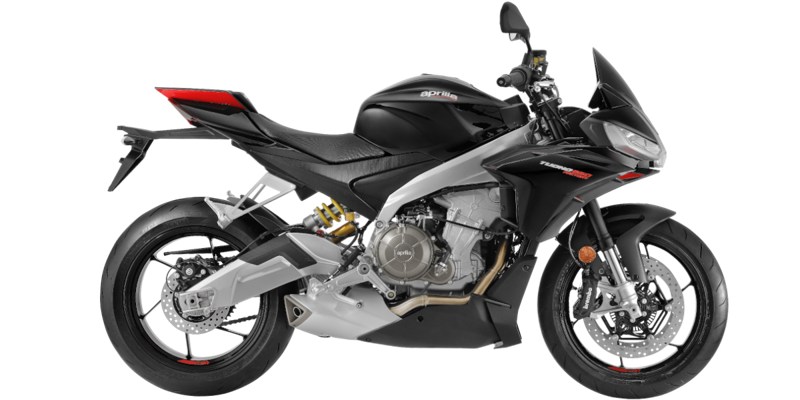
Aprilia TUONO 660 FACTORY E5 2022+ — P80EBE13 · CM301832 Stock BIN

| ECU P/N | P80EBE13 · CM301832 |
|---|---|
| ECU type | Marelli IAW 11MP (11MPHW001) |
| Calibration ID | P80EBE13 · CM301832 |
| Model years | 2022+ |
| Compatible BIN size | 3584 KB |
€80.00
You receive: Stock BIN file
Instant email delivery · Verified map preview · Secure PayPal checkout
File reference & categories
Description
Stock/OEM BIN file for Aprilia TUONO 660 FACTORY E5 (2022+), Marelli IAW 11MP (11MPHW001, Boot FF59) in Dimsport OBD 3,584 KB format (FLASH_0841). SW: P80EBE13, Cal: CM301832, Market: EMEA. Tier: AKRAPOVIC RACE. Notes: Calibrazione Tuono 660 Akra+IMU Racing TOP - EMEA 2S001792 + 2S001795 KIT SCARICO RACING COMPL. DI COLLETTORE + KIT PIATTAFORMA INERZIALE | Latest update of Europa Racing Factory map - Akrapovic TOP approved
ECU: Marelli IAW 11MP (11MPHW001, Boot FF59, Codebase CB05). SW: P80EBE13, Cal: CM301832, Market: EMEA. Match HW ID, Boot Gen (FF59) and SW ID before flashing.
Size: 3584 KB
Calibration ID: P80EBE13 · CM301832
ECU part number: P80EBE13 · CM301832
to check for an exact reference match before choosing a definition.
More Aprilia TUONO 660 FACTORY E5 ECU BIN & XDF Files
BINP80EBI14 · CM301843MotoBinXDF.com.binAPRILIAP80EBI14 DIMSPORT XDF 
Aprilia TUONO 660 FACTORY E5 2022+
P80EBI14 · CM301843
CalibrationP80EBI14 · CM301843
Reference BIN · 3,584 KB
€80.00EURXDF 
Aprilia TUONO 660 FACTORY E5 2022+
P80EBI14 · CM301843
CalibrationP80EBI14 · CM301843
Reference BIN · 4,096 KB
€80.00EURBIN11MPHW001MotoBinXDF.com.binAPRILIAP80EBE13 3 BIN11MPHW001MotoBinXDF.com.binAPRILIAP80EBI14
Technical FAQ
How do I open this Aprilia TUONO 660 FACTORY E5 P80EBE13 · CM301832 BIN in TunerPro?
Open the BIN in TunerPro or TunerPro RT and select a separate XDF for its calibration and the 3584 KB BIN layout. Check that your reading or flashing tool supports that layout before using the file.
How do I verify my Aprilia TUONO 660 FACTORY E5 BIN matches P80EBE13 · CM301832?
Compare the ECU part number, calibration ID and read format with the listing. Use the BIN identification tool to compare your file’s fingerprint and size with the reference catalogue without uploading the BIN. A modified read may not match.
Does TunerPro automatically correct the ECU checksum?
TunerPro can calculate checksums when the definition and a compatible plug-in support the exact ECU layout. Verify the saved BIN before flashing with the ECU BIN Checksum tool if the layout is supported, or follow your flashing tool’s checksum instructions.
ECU FILE TOOLS
ECU BIN Checksum
Check and correct supported Japanese motorcycle ECU BIN files.
No file selected · Maximum 16 MiB
Processed in your browser. Your file is never uploaded.
Only recognized ECU layouts can be corrected. Your original file is kept unchanged.
Ready to check
Choose your BIN file, then check its checksum.
Contact Us
Need help with a file, payment or download? Send a message to [email protected].
File Request
Can't find the BIN or XDF you need? Tell us about your ECU and the file you are looking for.
A file request does not create an order or charge your card. Any attached BIN is handled privately and is never published or executed.
YOUR MOTOBINXDF ACCOUNT
My Account
Manage your details, orders and downloads.
Loading your account…
Help
How do I find the right file?+
Choose BIN Files or XDF Files, then manufacturer, model and year. You can also search by ECU part number or calibration ID. Check the exact software reference on the product page.
How does BIN identification work?+
Your browser calculates the file fingerprint and sends only that fingerprint and its size for comparison. The BIN stays on your device. Only an exact reference match returns linked definitions. Modified or unknown files may not match.
What are BIN and XDF files?+
A BIN contains ECU binary data. An XDF describes the maps and settings for compatible software such as TunerPro. The definition must match the ECU software.
Which TunerPro version should I use?+
For XDF patch operations, use TunerPro 5.00.10305. Our tests found that TunerPro 6.0.496.0 can read patch data incorrectly after reopening a definition. Always edit a copy of your original BIN.
How can I purchase a file?+
Prices are in EUR. Add a file to your cart and pay securely with PayPal. You can check out as a guest. Download links are sent to your PayPal email address; your checkout shows the download limits before you pay. Sign in to My Account to view your orders and eligible account discounts. For enquiries, contact [email protected].
How can I request a file?+
Use File Request to email us directly from the website. Include the model, year, ECU part number and calibration ID. You can attach a reference BIN up to 16 MiB.